Multiselect with Inclusive/Exclusive Toggle
Last updated: February 21, 2025
Use Case
You may have a multiselect dropdown that has many options, and users sometimes may want to select just a few, or they may want to select all but a few.
Solution
Add a toggle onto the dashboard that controls where the multiselect is inclusive or exclusive. Then users will only have to select the smaller number of options.

Configuration
Create the multiselect as normal.
Add a toggle that has two options, with the values set at
inandnot in, and the displays set asInclusiveandExclusive(the display values can be adjusted to your preference).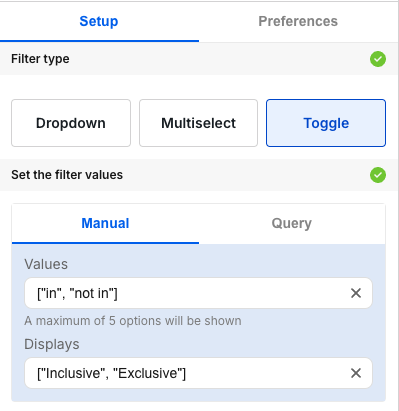
Filter the dataset using this dynamic operator by adding this line to the where clause of dataset query:
[[and <column_name> {{<toggle_name>.raw}} {{<multiselect_name>}}]]
Notes:
The dataset powering the filter must be different than the dataset powering the visualization.
The filter doesn't need to be connected to the visualization in the UI, because the adjustment to the dataset itself will manually connect the two.